Welcome to my blog

First post and a short intro about myself.

Latest Overseas Trip Selections (SkyDrive Link)

Photo: Seoul Buddhist Temple, 2010

Milano (SkyDrive Link)

Via Monte Napoleone, Milan June 2010

Timisoara (SkyDrive Link)

Dicasterial Palace, Timisoara - July 2010

Valley of Liman (SkyDrive Link)

Valea lui Liman.

Arad (SkyDrive Link)

Monastery Hodos Bodrog - Arad (SkyDrive Link)

Sunday, April 3, 2011

Build a blog with a free template

I stumbled across a blog template, on the week-end, and that was all it needed to start my first blog. 

So, I signed up for a blog with blogger, in the process I found out that they have just become part of google, and start fiddling with the settings, profile and gadgets. That was easy,  and in the end, after an hour or so,  I had a blog with a few images and no posting as I didn't know what to  write ... Coming from a web background, I looked at the blog for a while and it seemed so plain with its blueish background and most of all so narrow...
Then, I looked again to the site with the free blogger templates  and picked one that I liked (probably because was very much like one of my websites  - colour-wise at least).

From the template implementation help it seemed a few minutes job...but here is my experience;
  1. Go to http://btemplates.com/
  2. Preview the template of your choice
  3. Click on the template icon to see the download and How to use this template instructions
  4. Follow the 5 steps, finishing with step 6. Enjoy!
...and you should because all works fine.

But then, I looked to my blog  and start thinking how can I update all those links and menus and gadgets ..effortless. I searched through the admin tabs (Posting, Comments, Settings, Design, Monetize, Stats) and decided that Design tab must be the one. And indeed it is as it gives you access to editing Page Elements, Edit HTML and Template Designer. After going through the
  • Page Elements: you can edit various parts of the blog and 
  • Template Designer : change some template elements (color, width, gadgets, etc)
I realised that the only way to change those menus and add new pages was by EDITING the HTML.

For that you must really know a bit of HTML and especially you need a Text editor (www.textpad.com is my preferred).
To edit the source of the template you'll need to do the following:
  1. Download the template on your PC (there is a download link)or cut/paste the whole window
  2. Search for the menu links and update them 
  3. Update the links to the social media networks like facebook, twitter, and any other you have...
  4. Make sure you keep a copy of the original source as downloaded at 1. - if something goes wrong you can start over afresh.
  5. Upload the edited template and then PREVIEW it - to make sure you have a working blog
  6. Only then save the template.
  7. You will do that quite a few times ...like me...as new links need to be added. 
Bottom line if you're not confident working with HTML code you'd better stick with the default blogger templates. 

Saturday, April 2, 2011

Worked on the blog...

There's some more info and especially lots of links from the 2010 Euro Trip.

The new template looks much better but requires a lot of html editing...nothing is for free.

Welcome to my blog

France 2008...
It's late at night and I decided to give it a go...and start capture some of my thoughts...and IT guides.
First a short introduction:
I came to Sydney from Milan on  May 17, 1995 and since then I'm at The University of Sydney, currently as IT Operations Manager (ITO). Languages spoken at home, now in this order (changed in time): English, Italian and a  mixture of both. Last time I've been in Milan is May-July 2010 when we've been on a re-discovery "channel" of friends and places.

Overseas Roles include: LABEN SpA: On Board Data Handling Department (OBDH) where I designed, tested and documented service modules on board of scientific missions payloads.
Some of the Space programs/missions I was involved in:

  • Infrared Space Observatory (ISO) - an infra-red light space telescope (2.5-240 micrometres) designed and operated by ESA in cooperation with NASA and successfully launched into orbit on Nov 17,1995 on board of Ariane-44P launch vehicle.
  • X-ray Astronomy BeppoSAX satellite - study of X-ray emission from celestial objects.
    STS-65 Space Shuttle Program launched from Kennedy Space Centre, Florida July8, 1994: Spacelab International Microgravity Laboratory (IML-2) with Microgravity Bubble, Drop and Particle Unit (BDPU) experiment - 2 successful missions.
  • Polar Platform - part of the Space Stations Freedom - a permanently manned Earth-orbiting station was incrporated into the International Space Station, and internationally developed research facility.
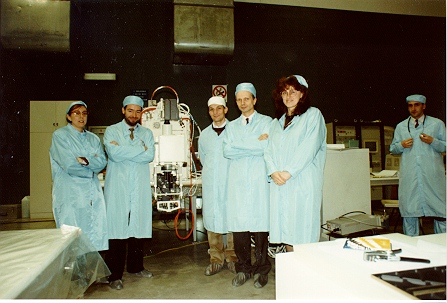
The following images are from the Alenia Clean Room in Torino while testing the BDPU(Bubble, Drop and Particle Unit) module:
With a few BDPU team members - Clean Room Alenia, Torino.
The BDPU integration and testing team.

This year: 
I'm manageing  the migration of  IT services to university ICT and all went well  with most of the stages completed. More about that later.
The Web Services  remained in-house and I enjoy maintaining them on a RHEL VM.